AssociateType On Find Enroller Pop Up

0
In the 'Find Enroller Pop Up' our company has multiple AssociateType's that are searchable and often times a Distributor will have an account of each type. Therefore when a customer searches for said Distributor both of their accounts come up and it is hard to distinguish which is which (see screenshot below).
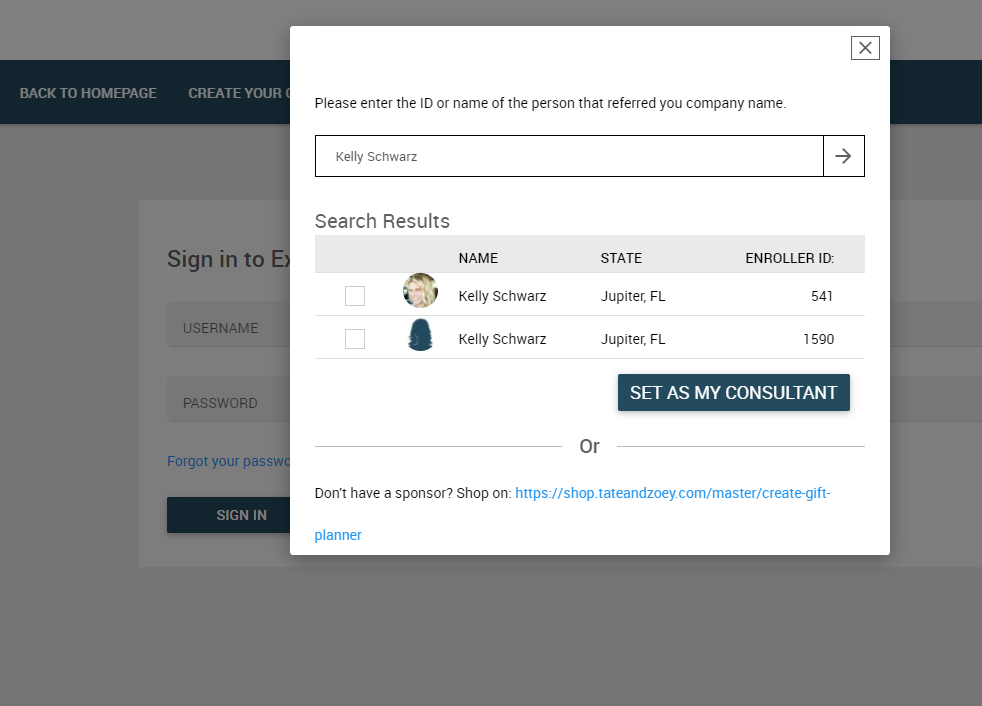
It would be very helpful if there was a toggle in the Retail Admin Global Settings (https://[CLIENTID].admin.directscale.com/#/EcoCompanySettings) next to the setting for specifying which "Allowed Customer Types..." show up, that adds a column to the table above for AssociateType. This way any user could easily distinguish the type of account they are selecting.
Thank you,
Luke Miller
Tate + Zoey
Comments
Luke Miller thank you for taking the time to make this suggestion. It looks like you are now integrated with one of our partners for your shopping platform, so this request is probably irrelevant now. But, I wanted to make you aware that any external shopping application could leverage our public APIs to accomplish the very thing you desire. Check out the Search Associates public API and you will see that it returns a substantial data set for users returned in a search, including the AssociateType and the AssociateTypeId. If you have any follow up questions from this let us know.
Please sign in to leave a comment.